
Load cases
Click on this command to select the different load cases for analysis. Most of the time, selecting a load case is as simple as checking the corresponding checkbox.
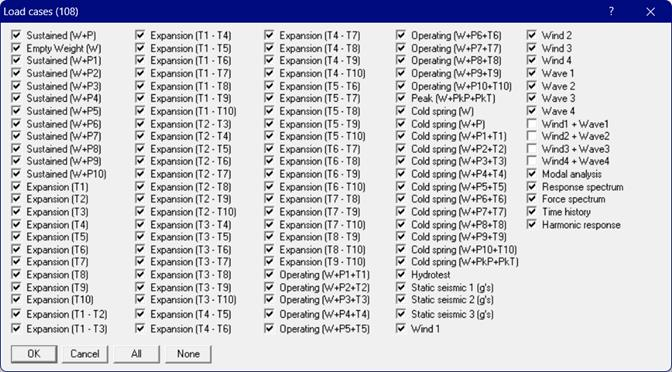
Empty Weight (W):
Empty Weight (W) analysis includes the weight of piping, components, insulation and lining but excludes the weight of content. In addition, pressure stress is excluded from the analysis.
Sustained (W+Px):
Sustained (W+Px where x = 1 to 10) analysis includes the weight of piping, components, content, insulation and lining. It also includes operating fluid pressure and its effect in the analysis.
Operating (W+Px+Tx):
Operating (W+Px+Tx where x = 1 to 10) analysis includes the weight of piping, components, content, insulation and lining. It also includes operating fluid pressure and its effect as well as the effect of temperature increase/decrease in the analysis.
Peak (W+PkP+PkT):
Peak (W+PkP+PkT) analysis includes the weight of piping, components, content, insulation and lining. It also includes Peak Pressure and its effect as well as the effect of Peak temperature increase/decrease in the analysis where PkP = Peak Pressure and PkD = Peak Temperature.
Cold Spring (W+PkP+PkT) will be shown only when a cold spring (Cut pipe element) is input into the model. When these load cases are selected for Analysis, CAEPIPE will compute and show results for Displacements, Element Forces & Moments, Support Loads and Support Load Summary. These load cases are NOT included in Stress Calculations, Equipment Qualifications and Flange Equivalent Pressure Calculations.
For a few others, load cases appear in this dialog only after you input their related data. For example, to perform a Response Spectrum analysis, you need to
· First input Spectrums (under Misc menu)
· Then, select those spectrums under the menu Loads > Spectrum.
· Finally, you go back into menu Loads > Load Cases and check the box next to Response Spectrum for analysis.
As another example, the Cold Spring load cases do not appear in this dialog if you have not input a “Cut pipe” element in the layout window.
Further, multiple expansion and operating load cases appear here only when you set multiple thermal loads under Options > Analysis > Temperature in the Layout window.